How to play Windows games on an Apple Silicon Mac: every method, free and paid
Uncork access updated 20 November 2026 · a section on free apps for Steam by macOS version, Bridgeplay and MaPC checked on 3 November 2026 (Uncork 1.5.6) · apps, Elden Ring, Parallels and Steam Link checked on 31 October 2026; prices of virtual machines and streaming services checked on 29 September 2026
Short answer: on a Mac with Apple Silicon (M1 or later) there are four ways to play a Windows game: a compatibility-layer app such as Uncork, Highball or the Whisky fork (all three are free); Windows 11 in a virtual machine (Parallels Desktop, VMware Fusion); streaming from the cloud (GeForce NOW, Xbox Cloud Gaming); or streaming from your own PC (Moonlight, Steam Link). Boot Camp works only on Intel Macs. For single-player games without kernel-level anti-cheat, the simplest thing to try first is a compatibility-layer app: Uncork, for example, is notarized by Apple and sets up the Windows version of Steam in one click, with no Terminal and no Uncork account. Games whose anti-cheat runs in the Windows kernel (Valorant, Fortnite) will not run that way; for them there is streaming or a console. We make Uncork, so below we also say where it does not fit.
Does the game have a Mac version?
Check this first: the most reliable way to play on a Mac is the Mac version. On a game's Steam page, the system requirements show whether macOS is listed. Uncork points out a Mac version on its own only for games marked that way in its built-in community database (about 30 for now), so if there is no hint, check Steam anyway. Native Apple Silicon games run with no translation cost. Intel-only games run through Rosetta, and Apple says macOS 27 is the last version with full Rosetta: in macOS 28 it will remain only for certain older games (what this means).
PlayCover runs iPhone and iPad games, but those are not Windows games. Whether Windows games can be played on an iPad itself is covered on a separate page.
Every way at a glance (as of 31 October 2026)
| Way | Examples | Price | Where the game runs | Main limit |
|---|---|---|---|---|
| Native version | the game's own Mac build | included in the game's price | on the Mac | only what the publisher released for the Mac |
| Compatibility-layer app | Uncork, Highball, the Whisky fork, Grapple | free: Uncork, Highball, the Whisky fork; Uncork's optional game features are currently free too; Grapple: one game free, the whole library €29 a year | on the Mac, with no Windows inside | some games do not start; kernel-level anti-cheat does not work |
| Windows 11 in a virtual machine | Parallels Desktop, VMware Fusion | Parallels is paid, Fusion is free; the Windows licence is extra | in Windows on the Mac | Parallels supports DirectX up to 11.1; most anti-cheats refuse to run in a virtual machine |
| Cloud streaming | GeForce NOW, Xbox Cloud Gaming | a free plan with limits, or a subscription | on the service's servers | only games from the catalogue; needs a fast connection; monthly hour caps |
| Streaming from your own PC | Moonlight with Sunshine, Steam Link | free | on your Windows PC | you need a PC with a graphics card |
| Boot Camp | — | — | — | Intel Macs only |
Which way is best in 2026?
There is no single best way: it depends on the game. For single-player games without kernel-level anti-cheat, a compatibility-layer app is the cheapest and simplest thing to try first, and several of them, Uncork among them, are free; only trying it will show whether a particular game runs. For games with kernel-level anti-cheat, the choice is streaming or a console; for a program that needs real Windows and DirectX 11, a virtual machine.
| Situation | What fits | Limits |
|---|---|---|
| The game has a Mac version | the native version | only what the publisher released |
| A Windows game without kernel-level anti-cheat, and you want to play on the Mac itself | a compatibility-layer app | some games will not start, some frame rate is lost to translation |
| A game with kernel-level anti-cheat (Valorant, Fortnite, Apex Legends) | streaming from your own PC, the cloud (if the game is in the catalogue) or a console | needs internet; in the cloud the game must be in the catalogue, and paid GeForce NOW plans have a monthly hour limit |
| You need real Windows and games on DirectX 11 or older | Parallels or VMware Fusion | DirectX 12 is not advertised: some such games will not start or will run with limits; many anti-cheats refuse to run in a virtual machine; a Windows licence is bought separately |
| You want a heavy new game and your Mac is weak | streaming | depends on the network, the service's catalogue and its hour limit |
How do I play Windows-only Steam games on a Mac?
If a game's Steam page lists only Windows, Steam for Mac will not install it. The usual way around this is to run the Windows version of Steam itself on the Mac, in a compatibility-layer app. In Uncork it goes like this:
- Install Uncork and let it set up Windows Steam: it is one click, and if Rosetta 2 is missing, the app offers a button to install it.
- Sign in to your own Steam account in Steam's own window: Uncork never asks for your password or Steam Guard code. Your library is the same as on a PC.
- Install the game and press Play. If the game lacks .NET or DirectX components, Uncork offers to install them; if it still does not start, Find out why looks for the cause. All of this is free.
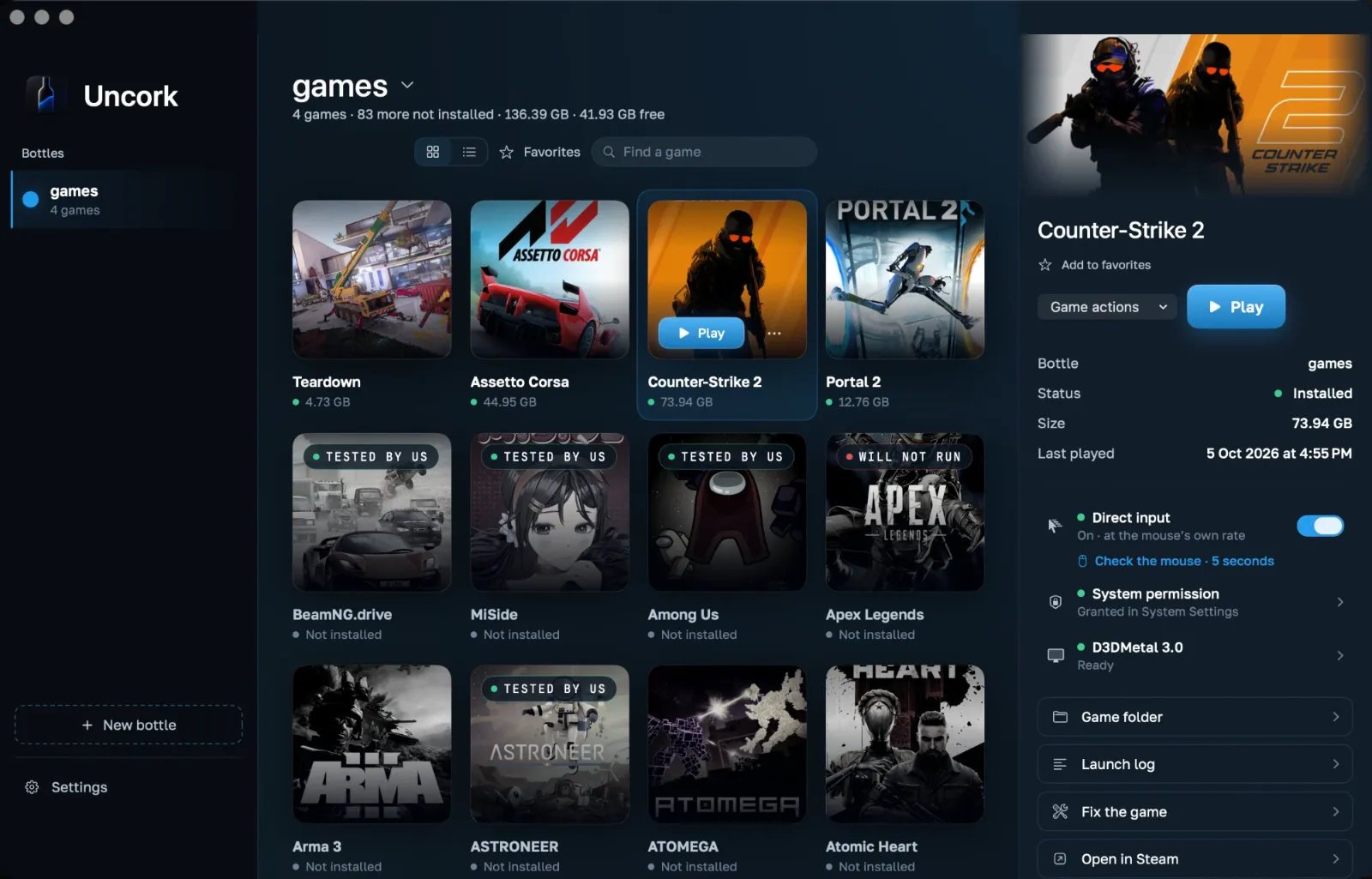
You can only roughly tell in advance whether a particular game will run: Uncork lists the 14 games we ran ourselves and carries a snapshot of the open highball-db database (540 entries as of 22 October 2026), with community reports where it has them. Bridgeplay, a free open-source app, takes another route: per its site, it adds Windows-only games to the Steam for Mac library you already have (Steam only, macOS 26 or later). It also re-signs Steam on your Mac, and its own site warns that Valve does not support this and that it may go against the Steam Subscriber Agreement. Without a compatibility-layer app, you can stream the game from your own PC with Steam Link or play it in GeForce NOW if it is in that service's catalogue.
What can you try in Uncork?
- Race in Assetto Corsa. Uncork prepares the Windows components the game needs and launches it through Steam, both for free. With Pro, Uncork runs Assetto Corsa on DXMT: with Custom Shaders Patch 0.3 under D3DMetal we saw pink squares on edges and highlights. Assetto Corsa setup and graphics tests.
- Play CS2 and check your mouse. Launching CS2 through Steam and the mouse check in Uncork are free. With Pro, direct mouse input reads movement straight from the mouse at the rate the device reports it, while the game is in focus and hides the cursor over its window. This needs the Input Monitoring permission. CS2 setup, VAC and FACEIT · Why the mouse feels floaty in games on a Mac.
- Translate visible game text. The free on-screen translation (beta) translates menus, hints and visible subtitles into English, Russian, Japanese, German, French or Spanish. It requires macOS 15 or later and works offline after a one-time download of the language pair. See the Portal 2 example and how to turn it on.
How can I play Windows Steam games on an M1 Mac for free?
For free and without a virtual machine, in one of the apps below. All of them run on any Apple Silicon Mac, from M1 to M5, but they need different versions of macOS: check yours in the Apple menu → About This Mac. The apps are free; you still buy the games on Steam as usual.
| App | macOS | Stores | Price and code |
|---|---|---|---|
| Uncork, ours | 14 or later | Steam; installs the Epic client (launching Epic games not tested) | free; optional game features are currently free too; closed source |
| Highball | 14 or later | Steam and Epic | free, GPL-3.0; beta |
| Pixel Port | 14 or later | Steam only | no price on the site, a free beta per reviews |
| Whisky fork (frankea) | 15 or later | per the README Steam, Epic, EA App, Rockstar, Battle.net | free, GPL-3.0 |
| MaPC | 15 or later | Steam, Epic, GOG, Amazon; EA app as described, not yet reliable | free, supporter extras from $4.99; public beta 1.1.22 |
| Bridgeplay | 26 or later | Steam only: Windows games appear right in Mac Steam | free, GPL-3.0; per its own site, it modifies Steam in a way Valve doesn't endorse |
So on macOS 14 that leaves Uncork, Highball and Pixel Port, macOS 15 adds the Whisky fork and MaPC, and Bridgeplay needs macOS 26. Data about other apps comes from their own pages: Bridgeplay and MaPC as of 3 November 2026, the rest as of 31 October; prices, stores and notarization side by side are on the comparison page.
Can you set everything up in one click, without the Terminal?
Yes. Most apps of this kind set themselves up from their own window. In Uncork it is one click: the app downloads its compatibility engine, the graphics libraries and Windows Steam by itself, with no Terminal and no Homebrew; Apple's D3DMetal library is downloaded only after you accept Apple's licence in the app's window. Highball and Pixel Port also promise one-click setup on their pages (checked on 31 October 2026).
The command line is still needed for some tools. Sikarugir, a builder of a separate wrapper for each game, installs through Homebrew according to its README, that is, with a Terminal command. For Apple's Game Porting Toolkit (now version 4), Apple itself points to community projects such as Homebrew: it is a tool for developers who evaluate and port their games, not an app for players.
Which apps run Windows games on a Mac?
Such an app translates a Windows program's calls into macOS calls and DirectX graphics into Metal. There is no virtual machine and no Windows inside, so there is usually less overhead than in a virtual machine, but we have not compared speed and on a given game the result can differ. Many apps set up a separate “bottle” and put the Windows version of a store (for example Steam) into it, while some build a separate wrapper for each game. Some games do not start.
Going by their own pages on 31 October 2026:
- Free: Uncork, our app (runs games from Steam and installs the Epic client; its optional game features are currently free too); Highball (open source, GPL-3; Steam and Epic; 21 games tested by hand); the Whisky fork by frankea (open source, macOS 15 or later); Heroic (open source, GPLv3; Epic, GOG and Amazon, no Steam); Mythic (open source, alpha); Bridgeplay (open source, Steam only, macOS 26 or later); MaPC (Steam, Epic, GOG and Amazon, macOS 15 or later, beta; supporter extras from $4.99); Pixel Port (Steam games, macOS 14 or later, beta).
- One game free: Grapple runs one game for free, and you can swap it every 30 days; the whole library is in Grapple Pro at €29 a year.
- Paid: Bourbon 26, $29.99 once (on sale for $19.49 on 31 October 2026), one purchase for 3 Macs.
- Public beta, no price stated: GameHub for Mac.
- Per-game tools: Sikarugir, which builds a separate wrapper for each game, and Porting Kit with ready-made setups for individual games (as of 29 September 2026: on 31 October we could not read its site).
Price, licence, stores and notarization side by side are on the Compare page; what happened to Whisky and what replaces it is on the page about Whisky alternatives; why aim can feel floaty in shooters on a Mac (macOS hands mouse movement to ordinary programs in batches, once per display frame) is on the mouse page.
Can you play Windows games in a virtual machine?
A virtual machine runs real Windows 11 for ARM processors, and Windows games inside it. Games see ordinary Windows, but graphics are limited: Parallels Desktop says it supports DirectX up to version 11.1, that some games may not run on Apple silicon because of the architecture, and that most anti-cheat software will not run in a virtual environment (its support article, last reviewed on 25 August 2026). It is paid: a subscription or a one-time purchase; with the Europe region selected (the price is injected by a script based on location) the Standard subscription showed 64.99 € a year on 29 September 2026 against a struck-through 99.99 €. VMware Fusion is free (you need a free Broadcom account), and according to Broadcom's documentation the Apple silicon version supports DirectX 11 from 13.5. A Windows licence is bought separately everywhere. UTM is free and open source but, by its own FAQ, has no 3D acceleration for Windows, so games there are “probably not”.
Can you stream Windows games to a Mac?
The game runs on another computer and your Mac shows the video. This is a way to play games with kernel-level anti-cheat without leaving the Mac, but only if the publisher allows the cloud: Valorant, for example, does not run in cloud services, and you are left with streaming from your own PC or a console.
- GeForce NOW. Three plans: free, Performance and Ultimate. In the US, according to NVIDIA in August 2025, Performance cost $9.99 a month and Ultimate $19.99; on 29 September 2026 we could not read the price table on NVIDIA's site. Paid plans have a limit of 100 hours of playtime a month, and up to 15 unused hours roll over. You need to own the games, in a supported store. There is a Mac app with Apple Silicon support.
- Moonlight and Sunshine, Steam Link. Free. Sunshine goes on your PC with a graphics card, and Moonlight shows its screen on your Mac; Steam Link, Valve's free app for macOS 12 or later, streams games from a computer running Steam on the same local network. You need your own powerful computer.
- Xbox Cloud Gaming. Works in a browser (Safari, Chrome, Edge). Needs a Game Pass subscription; per the Game Pass page on 29 September 2026, cloud playtime is capped (5, 10 and 15 hours a month on Essential, Premium and Ultimate). Besides the catalogue, select games you own can be streamed.
Exotic options
Asahi Linux runs Linux on Macs with M1 and M2, and has a gaming toolkit that uses x86 emulation: it was announced as an alpha in October 2024, and we have not checked anything newer. On the base M3 the graphics driver is in development; on the M3 Pro and Max, and on the M4, work is not currently under way (status TBA in the project's tables), so for most current Macs this is not an option.
Can you play Elden Ring on an Apple Silicon Mac?
Not natively: on 31 October 2026 its Steam page lists only Windows, and the requirements ask for DirectX 12 and 60 GB of space. What is left:
- A compatibility-layer app, offline only. AppleGamingWiki (page edited on 12 May 2025) rates the game playable this way, but online features do not work because Easy Anti-Cheat does not run. In Uncork, Elden Ring carries the community mark “reported to run”: on 31 October 2026 the open highball-db database has four reports from Highball users, all with the top rating, on Macs with M1, M3, M4 Pro and M4 Max (22 September to 21 October 2026). The longest session lasted 231 minutes; frame rates were not recorded. We have not run Elden Ring ourselves.
- A virtual machine will not do. Parallels supports DirectX up to 11.1, and AppleGamingWiki marks the game unplayable in Parallels.
- Online play (co-op and invasions) needs Easy Anti-Cheat: on a Mac, stream the game from your own Windows PC instead, for example with Steam Link or Moonlight.
Will a particular game run?
What is known about running a game on a Mac — our own test, player reports with dates and Macs, or an anti-cheat or publisher block — is collected on its page. Popular ones: Grand Theft Auto V Legacy, Elden Ring, The Witcher 3: Wild Hunt, Red Dead Redemption 2, Hogwarts Legacy, Palworld, Path of Exile 2, Sekiro: Shadows Die Twice, The Elder Scrolls V: Skyrim Special Edition and Phasmophobia. Cyberpunk 2077 and Baldur’s Gate 3 have Mac versions on Steam. Every game is in the catalog; the 100 most popular Steam games, each with a one-line answer, are on one page.
When Uncork fits and when it does not
Uncork is our app: free, built on a compatibility layer, for Apple Silicon Macs (M1 or later, macOS 14 or later); the current version is 1.7.6.1, released on 22 November 2026. It runs Windows games from your own Steam library and installs the Epic Games Store client; we ran 14 games ourselves, and the app also shows reports from other players, from a snapshot of the open highball-db database (540 entries as of 22 October 2026). Launching games from Steam, installing the Epic client, Game Mode, gamepad and console modes, Windows components (.NET, DirectX, fonts) and translation of game text right on screen (beta, macOS 15 or newer) are free and need no Uncork account. Since version 1.0.12 it is signed with Developer ID and notarized by Apple, so it opens like any Mac app.
Uncork Pro's optional features are the mouse read straight from the device (at the mouse's own report rate), “Even frames” for single-player games, the in-game panel, frame generation with Apple's MetalFX (beta, macOS 26 or later), rewind with ⌘Z (beta, only for games on DXMT), one-click Content Manager and the race screen for Assetto Corsa, and Logitech G923 wheel force feedback (tested in Assetto Corsa). To turn them on, click “Enable Pro for free” in the app. Launching compatible games will always be free. Existing purchases keep their benefits under the terms of use.
- It fits if you play single-player or racing games from Steam on an Apple Silicon Mac and want everything set up in one window, with no Terminal, and if you care about the mouse in shooters, even frames or a G923 wheel.
- It does not fit if your game has kernel-level anti-cheat (Valorant, Fortnite, Apex Legends), if you need open source (Uncork's code is closed), if you need many games checked by the developer (we have tested 14, on one Mac; for other games Uncork shows player reports and forecasts where there are any), if you have an Intel Mac, or if you need a promise for macOS 28 and later: Uncork runs on top of Rosetta, and Uncork Pro does not promise to work there.
Our measurements come from one Mac, a MacBook Pro 14″ with an M3 Pro: for example, 102 to 147 frames per second in CS2 on Dust II (D3DMetal, a borderless 1512×982 window, the lowest graphics settings; 30 September 2026, four runs). We have no figures for other Macs, the MacBook Air included. How we record a single game — with dates, conditions and what we do not know — is on the page How to play CS2 on a Mac: M3 Pro frame rates, mouse, VAC, FACEIT; the rest is in the FAQ.
Read next
- Free and paid apps for Windows games on a Mac, compared — price, licence, stores and notarization of sixteen apps; Uncork runs compatible Steam games for free
- What to use instead of Whisky on a Mac: free and paid options — what happened to Whisky, what replaces it, and how to move your bottles with their games
- Will your game run on Mac? — our tests, player reports and forecasts, with a basis and date
- Games with anti-cheat that do not work on a Mac — which anti-cheat games will not run on a Mac, and what to do instead
- Windows games stopped launching after macOS 27: reinstall Rosetta 2 — why Windows games stop launching after the update to macOS 27, the fix in one command, and what Apple says about macOS 28
- How to run Windows programs and utilities on an Apple Silicon Mac — A Windows-only program or utility on an Apple Silicon Mac: a Mac or web version, Run .exe in Uncork, Windows 11 in a VM, a cloud PC
- A Windows game won’t start on a Mac: how to find the cause — anti-cheat, Rosetta 2, Windows components, a missing window, graphics, memory, Steam, and what “Find out why” checks
- How to play GTA 6 on Mac — GTA 6 is on PS5 and Xbox only
Won’t start, crashes or something is unclear? Message us on Telegram at @uncorkwin and we’ll sort it out. If you sent a problem report from Uncork, include its number.