On-screen game translation in Uncork
10 October 2026
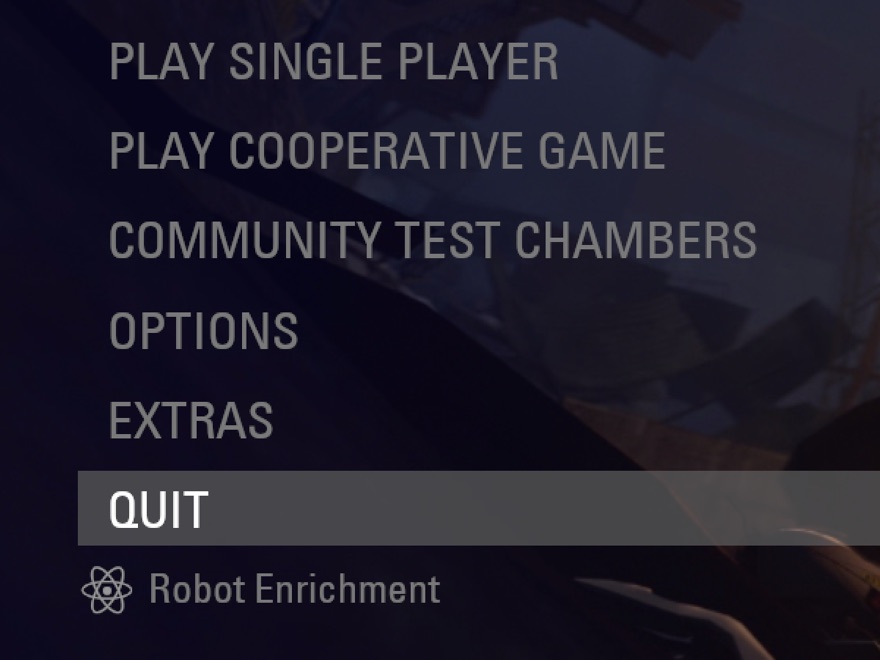
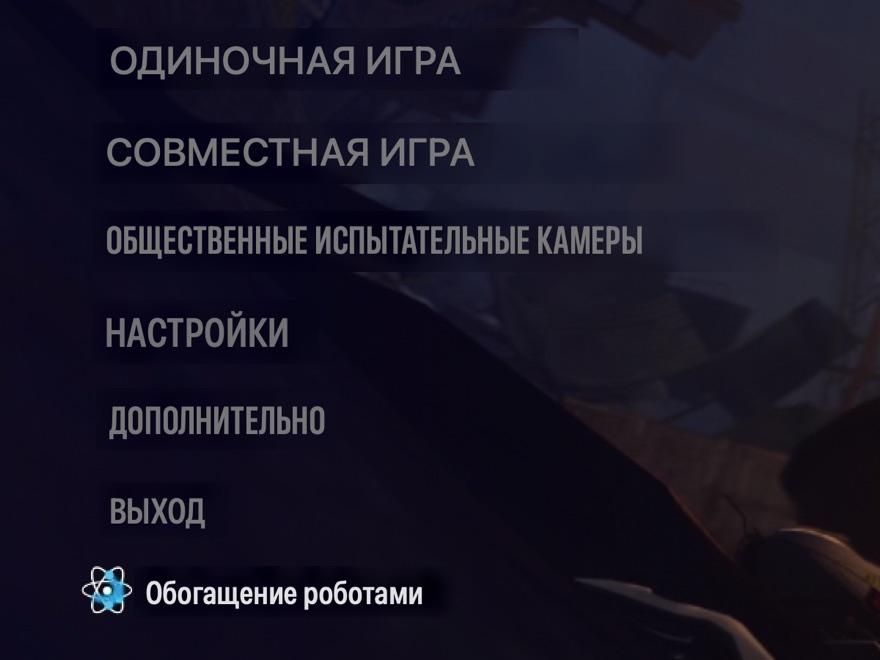
Since version 1.5 Uncork can translate a game's text right on top of it. Press a shortcut, and menus, dialogue and hints appear in your language, in the same places and in a similar font. The Mac does the translating itself, offline. It's free.
How to turn it on
- You need macOS 15 or newer.
- Uncork → Settings → “Translation over a game” → on. Pick the language and the shortcut there (⌃⌥T by default).
- Click “Download languages for offline translation” — macOS downloads the language pack once. After that no internet is needed.
- In the game, press ⌃⌥T. Press again to turn it off.
macOS asks for two permissions: Input Monitoring — so the shortcut works while the game window is in front, and Screen Recording — to read the text in the game window. Uncork looks only at the game window and never stores or sends frames or text.
How it works
Several times a second Uncork captures the game window, recognises the text and translates it with macOS's built-in models. It “erases” the original letters from the game's picture and writes the translation on top in the same colour and a similar narrow font. Short menu words (Quit, Options, Back…) come from its own dictionary — machine translation gets them wrong most often. Names the model merely spelled in another alphabet stay as in the game.
Uncork does not read the game's memory or inject anything into the game, so for anti-cheat the translation is just a window on top.
If the game has its own translation
The best translation is the game's own. When you turn on translation in a Steam game, Uncork asks the Steam store once whether the game has your language and, if it does, tells you: Steam → the game → Properties → Language. Portal 2, for example, has an official Russian translation. More on the “What Uncork sends” page.
Not perfect yet
- New text appears about half a second after the screen changes: fast subtitles may be ahead of the translation.
- Small or stylised fonts are recognised less well.
- It's machine translation: long dialogue can read awkwardly.
This is the first version. Tell us which game needs it and where it goes wrong — support.