Why aim feels floaty on a Mac: macOS delivers the mouse once per display frame
Measured 22–25 September 2026 · MacBook Pro 14″, M3 Pro, 120 Hz ProMotion, macOS 26
Play a shooter on a Mac with a gaming mouse and sooner or later something feels off: the counter says 100+ fps, the picture looks smooth, yet the crosshair behaves as if it were on a rubber band. Small corrections overshoot or fall short. The usual explanations are “Macs aren’t for games” or pointer acceleration. Acceleration does get in the way, but there is another cause, and it shows up in numbers. How much it matters in the game itself we have not shown with a separate measurement.
What we measured
We logged when mouse-moved events (NSEvent, mouseMoved) reach an app. The
mouse is a Logitech reporting at 1000 Hz, one report per millisecond. The display is a 120 Hz
ProMotion panel.
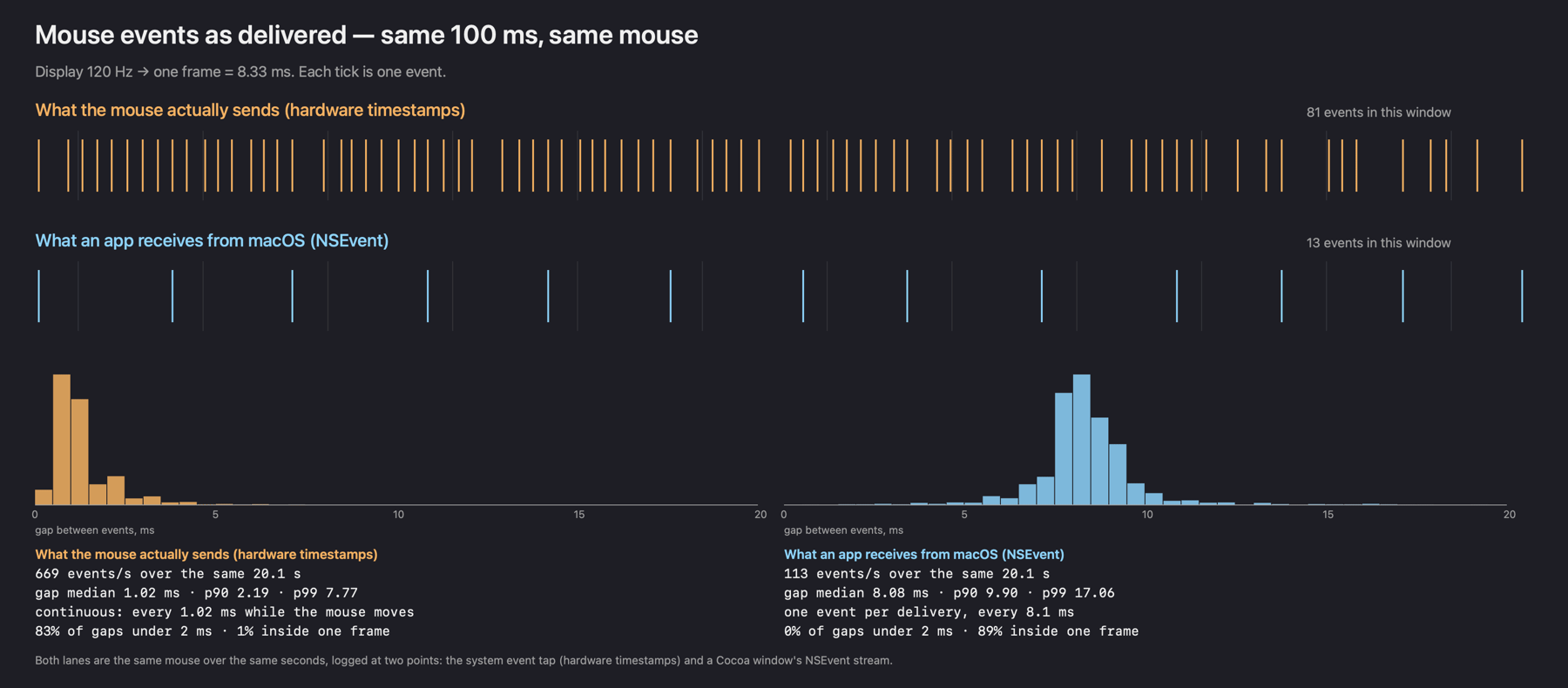
Expected: an event roughly every millisecond. Measured: events arrive in bursts, 8.33 ms apart — exactly the display refresh. On average about six mouse reports (up to eight during continuous motion) get merged into one event carrying their summed motion. We saw the same on an idle app with nothing to slow it down, and on 13 September inside a game process (no recording of that run was kept).
How many events a second reach your own browser you can see on “How many times a second your Mac hands the mouse to a program”: the check runs in the browser and sends nothing. That is the path to a browser, not to a game, so its numbers are its own.
We’re not the first to run into this. The sokol library (plain C, no middle layer) has issue #1344, “Sporadic input delay on MacOS Tahoe 26.0.1 (1000Hz mouse)”: on Tahoe with a 1000 Hz mouse input is delayed in places, and sometimes one motion arrives per frame instead of several. The cause is sought in WindowServer there, so it is a neighbouring problem. And in the Apple Developer Forums thread “Equivalent of coalescedTouchesForTouch in AppKit?” (and in “Changes in Mouse Event Reporting Frequency in macOS 26.2”) a developer reports that since macOS 26.2 mouse motion is thinned to the display rate and that he could not find an interface for the original points. It looks like how the system behaves, not a quirk of one game or engine.
Why a game feels it and the desktop doesn’t
On the desktop the bursts are invisible: the cursor is redrawn at the same display rate, so a burst just becomes one cursor step. A game is different. It runs at its own frame rate, and that almost never lines up with the bursts.
Take a game at 100 fps — a frame every 10 ms — and bursts every 8.33 ms. In 50 ms there are 5 frames and 6 bursts, so four frames get one burst of motion and the fifth gets two. With a steady hand the crosshair jumps twice as far on every fifth frame: twenty hitches a second (arithmetic, not a measurement). At 80 fps (12.5 ms) the pattern changes but doesn’t improve: frames alternate between one and two bursts. If the frame rate does not divide 120 (say 100 or 80), moving the cap only moves the hitches around; at 120, 60 or 40 fps the frame and the burst line up. As long as motion arrives in display-sized portions and frames run on their own clock, the two beat against each other.
If every frame got all the mouse reports from its own time slice, motion would be proportional to frame length and the beat would disappear.
What you can do without anyone’s app
- Turn off pointer acceleration (System Settings → Mouse). It’s unrelated to the bursts, but with it the same hand movement turns you by different amounts, and muscle memory stops working.
NSEvent.isMouseCoalescingEnabled = false, if you’re writing the app yourself. It’s the flag these threads have recommended for years. In our game driver turning it off changed nothing (13 September), and sokol dropped it on the suspicion that it floods the event queue; we have not made a separate measurement on macOS 26.2 with ProMotion.- Read the mouse through GameController — every report, and no permission prompt.
- Read the mouse from the device with IOKit — every report, but it needs Input Monitoring.
Every report, no permission: GCMouse
GameController’s GCMouse (macOS 11+) is meant for games, and it turns out not to go
through the display-rate path. On 25 September we recorded the same 20 seconds three ways at once:
a system event tap (hardware timestamps), NSEvent and GCMouse in one
window. Logitech G309 through its receiver, 1000 Hz.
| Source | Events | Per second | Median gap | P99 gap | Under 2 ms |
|---|---|---|---|---|---|
| The mouse (event tap) | 16,919 | 843 | 0.99 ms | 5.90 ms | 88.3% |
| GCMouse | 16,921 | 844 | 0.99 ms | 5.96 ms | 87.5% |
| NSEvent | 2,377 | 119 | 8.07 ms | 14.87 ms | 0.3% |
The recording app had no Input Monitoring grant (IOHIDCheckAccess returned
“unknown”), and no prompt appeared.
import GameController

let queue = DispatchQueue(label: "mouse", qos: .userInteractive)
NotificationCenter.default.addObserver(forName: .GCMouseDidConnect, object: nil, queue: .main) { note in
    guard let mouse = note.object as? GCMouse else { return }
    mouse.handlerQueue = queue
    mouse.mouseInput?.mouseMovedHandler = { _, dx, dy in
        // One call per device report. Deltas are linear, no acceleration curve;
        // dy is positive upwards, the opposite of NSEvent's deltaY.
    }
}- Deltas are linear and, in our measurements, carry no acceleration curve (we have not compared them directly against raw HID counts). For a shooter that is what you want; for a cursor, apply your own curve.
- The Y axis is inverted relative to
NSEventand to the HID report. lastEventTimestampis seconds since the Unix epoch, not since boot, so it doesn’t line up withmach_absolute_timewithout a conversion.- We measured with the recording window in front. Background delivery and behaviour inside other runtimes we haven’t tested.
Every report from the device: IOHIDManager
IOKit lets you subscribe to a device’s HID values. The callback fires for every report, with relative X and Y motion and the report’s timestamp:
import Foundation
import IOKit.hid

let manager = IOHIDManagerCreate(kCFAllocatorDefault, IOOptionBits(kIOHIDOptionsTypeNone))
IOHIDManagerSetDeviceMatching(manager, [kIOHIDDeviceUsagePageKey: kHIDPage_GenericDesktop,
                                        kIOHIDDeviceUsageKey: kHIDUsage_GD_Mouse] as NSDictionary as CFDictionary)
IOHIDManagerRegisterInputValueCallback(manager, { _, _, _, value in
    let element = IOHIDValueGetElement(value)
    guard IOHIDElementGetUsagePage(element) == UInt32(kHIDPage_GenericDesktop),
          IOHIDElementIsRelative(element) else { return }
    let usage = IOHIDElementGetUsage(element)        // kHIDUsage_GD_X or kHIDUsage_GD_Y
    let delta = IOHIDValueGetIntegerValue(value)     // raw counts, no acceleration curve
    let stamp = IOHIDValueGetTimeStamp(value)        // mach time of the report
    // X and Y of one report share a timestamp: accumulate until it changes.
}, nil)
IOHIDManagerScheduleWithRunLoop(manager, CFRunLoopGetCurrent(), CFRunLoopMode.defaultMode.rawValue)
IOHIDManagerOpen(manager, IOOptionBits(kIOHIDOptionsTypeNone))
Things that bit us:
- It needs the Input Monitoring permission (
IOHIDCheckAccess/IOHIDRequestAccess(kIOHIDRequestTypeListenEvent)). Without it the callback stays silent, with no error. The grant is tied to the app’s code signature: with ad-hoc signing, every rebuild silently resets it. - Some mice report motion through two HID interfaces, so the same movement arrives twice. Dedupe by device.
- Put the callback on its own thread with its own run loop: the main thread is busy drawing and handling window events, and reports would queue up behind them.
- Only read when you need to. While the cursor is visible, let the normal path work, or clicks on the interface will drift. We switch to direct reading only when the game has hidden the cursor over its window.
Where this comes from
We make Uncork, a Mac app that runs Windows Steam games on Apple Silicon. It started with Counter-Strike 2: at 100+ fps the aim felt mushy, and no game setting helped. The measurements above come from that. Today Uncork’s input driver reads the mouse with IOHIDManager while a game holds the cursor, and behaves normally the rest of the time; the GCMouse result is why we are now checking whether the Input Monitoring prompt can go away. On our reference MacBook Pro with M3 Pro, CS2 gave from 102 to 147 fps on Dust II in our measurement of 30 September; the records with dates and conditions are on “CS2 on a Mac: M3 Pro frame rates, mouse, VAC, FACEIT”.
If you’ve shipped a game or an emulator on macOS and hit the
same wall, we’d like to hear how you got around it — especially whether
isMouseCoalescingEnabled still helps anyone on current systems. Write to
hello@uncork.win.