Windows games
FreeYour games, on a Mac
Uncork puts the Windows version of Steam or Epic in a separate bottle — sign in, install your games, press Play. Ubisoft, EA, Battle.net and Rockstar open too; games are tested in Steam and Epic.
A friend invited you — the invitation is remembered. Once you link Uncork to your Mac, you get 15 % off Uncork Pro, and your friend gets a day of Pro (if that Mac was never linked to another account; at most 5 days a month).
You already have an invitation — the first one you followed is the one that counts.
The invitation link didn't work: no such code. Ask your friend to send the whole link again.
Apple Silicon · macOS 14+ · free · no account
Uncork installs the Windows version of Steam, Epic or another store and runs your games on an Apple Silicon Mac — no account, payment, time limit or limit on games. Bottles, Game Mode, gamepad mode and fixes are free too.
Mac with M1 or later · macOS 14+ · no account · Steam, Epic and more
Uncork is signed and notarized by Apple. Uncork never asks for your Steam password or Steam Guard code · what it sends.
Uncork is a Mac app — it can’t be installed from a phone. Open this page on your Mac.
Link copiedWindows games
FreeUncork puts the Windows version of Steam or Epic in a separate bottle — sign in, install your games, press Play. Ubisoft, EA, Battle.net and Rockstar open too; games are tested in Steam and Epic.
Game Mode
FreemacOS gives the game the CPU and GPU and polls controllers and headphones more often — just as it does for App Store games.
DualSense
FreeA DualSense or Xbox controller drives the Mac's pointer: pick a game and start it without getting off the couch.
up to 1000 Hz
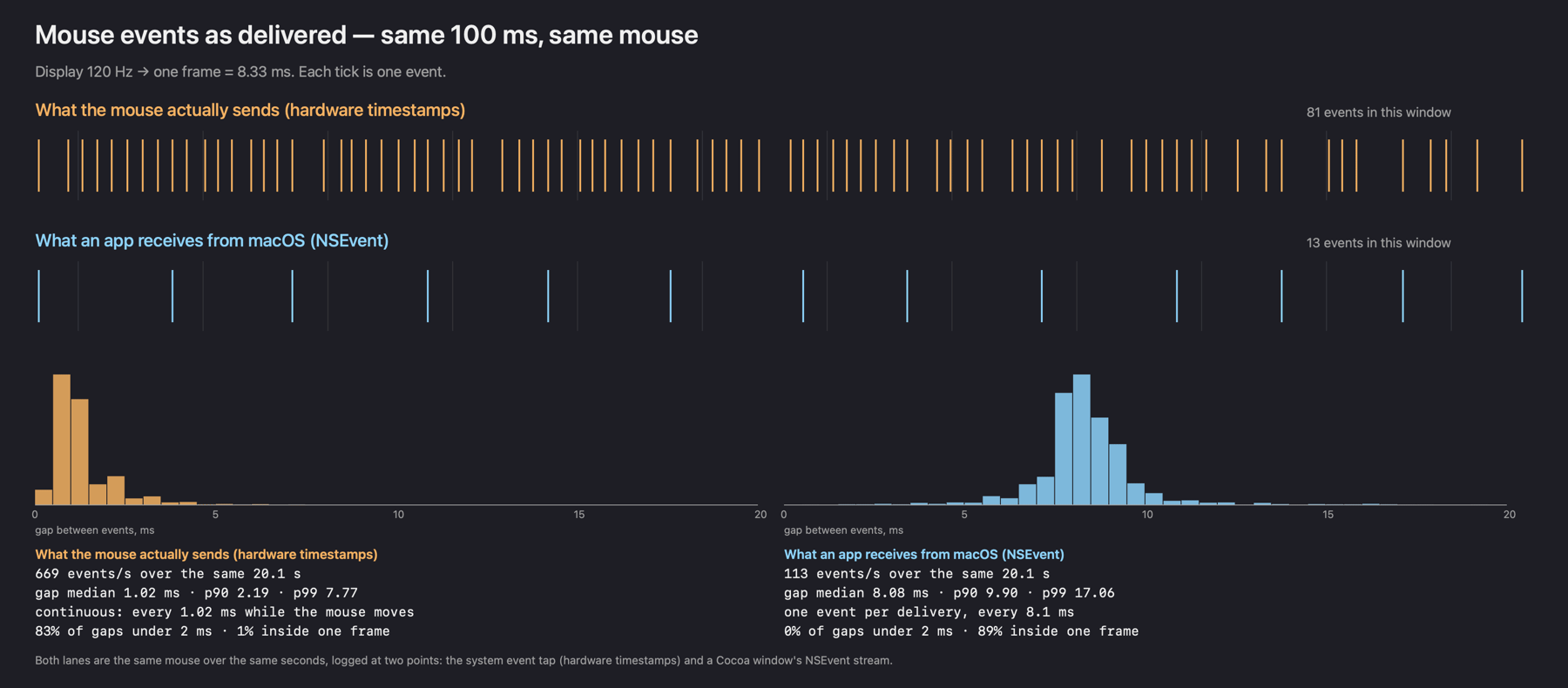
PromacOS hands the mouse to ordinary programs in batches, about 120 times a second. In games Uncork reads it straight from the device, up to 1000 times a second. Needs the Input Monitoring permission.
87%
ProFor single-player games: frames reach the screen at even intervals — 87% even versus 18% without it (measured in CS2 at 80 fps). On battery — an even 60.
HUD
ProFrames per second, the share of even frames, latency to the screen and the mouse rate — in the corner of the game, never in the frame itself.
Find out why
FreeThe Find out why button reads the log after a crash and offers a fix for that symptom. Every fix can be undone.
Steam
FreeOne button switches Steam to compatibility settings: no GPU-accelerated web views, no hardware video decoding, no overlay. We do not promise more frames from it, and undoing it is one button too.
5 seconds
FreeHow many times a second macOS hands your mouse to programs, in five seconds — in the app with the Check the mouse button, or right in the browser.
Assetto Corsa
ProAssetto Corsa runs through Steam for free: Uncork installs the Windows components it needs (.NET, DirectX, fonts) for free. Pro adds one-click Content Manager, a race screen to pick the car, weather and time, fixes for modded graphics, and G923 wheel force feedback.
Force feedback
ProForce feedback for the Logitech G923 comes with Uncork Pro and is installed with its driver. Tested with the PlayStation and PC version of the G923 in Assetto Corsa; the G29 is supported in code only.
7 days
ProThat many days Pro features work without a network. After that, go online once — and you get another week. Games in the free core need no key at all.
“Free” means no account and no time limit; “Pro” is in Uncork Pro, €19 once · measured on a MacBook Pro 14″ with M3 Pro; the polling rate depends on the mouse · what is free and what is in Pro ↓
Below is a live demo of the interface on this page: the windows really open. The library and the dates in it are an example, not your account.
5 games · 64 more not installed · 141.64 GB · 43.12 GB free
Engine 10.0 · D3DMetal 3.0 · ~/Library/Application Support/…/Bottles/gamesUncork driver ad7945d installedInput Monitoring: grantedLogitech G923 / G29 wheel force feedback: on · restart Steam after plugging in the wheelMouse check: what the mouse sends and how much of it reaches apps · 5 secondsCheck the mousefor single-player games; better off in competitive shooters · restart Steam to applyDXMT v0.80 installedMSync · ESync · environment variablesThe check covers the data of the Steam account signed in right now; run it again after switching accounts.
The proxy is off in macOS right now — nothing to passHTTP and HTTPS are passed; SOCKS and automatic proxy configuration (PAC) are not supported. Takes effect after Steam restarts.
“Engine settings” changes engine options, “Registry” the Windows registry. Use them only by a specific instruction: wrong changes can break this bottle.
Everything needed to make Windows games run on this Mac. Whatever is missing, Uncork downloads and installs on its own — no Terminal.
Apple Silicon · macOS 26.0 · Rosetta 2 in placeApple Silicon: M3 Pro macOS: 26.0 Rosetta 2: installed Free disk: 43.12 GB
249 MB · this is where D3DMetal comes from. Before the download you’ll accept Apple’s licenseModern Steam needs engine version 10 or newerd3d11 · dxgi → libd3dshared · without this games do not startNothing found. Try another name.
This bottle has no store in it yet.
Pro, no end date, all 1.x versions
Free and without an account: launching games, the engine, bottles, Steam and Epic, Find out why and fixes, Steam optimisations, Game Mode, gamepad mode, the mouse check. Pro is what Uncork built itself:
Signed in as Your nickname.
The Pro key is good for another 160 h (until 12.10 09:41).
This computer: 0f3c9a21b7d4Profile on the websitePro is tied to this computer: it won’t work on another Mac. Switching machines? Write to us and we’ll unlink it.
Installed 1.3.0 — the newest version known.
Engine 10.03.0 · wiredModern Steam needs engine version 10 or newer. GPTK is the source of the graphics libraries; engine 7.7 and the CEF fix do not remove transport error 0x3014.
MacBook Pro Speakers · 512 frames · 10.7 ms buffer · 48000 HzIf SDL games rasp, try Compatible sound · DirectSound in the bottle settings, then restart Steam. The device figures above do not measure the game’s latency.
Experimental: it does not hold on every macOS version or with every shortcut. Try it on your Mac and turn it off if it gets in the way.
The theme changes at once. Match system takes the dark blue one in macOS dark mode and the light one in light mode.
~/Library/Application Support/…/Bottles~/Library/Application Support/…/Runtimes~/Library/Application Support/…/CacheMoving copies the whole store into the chosen folder and verifies the copy. The original folder stays; absolute user paths may need updating by hand.
The cache holds downloaded installers and covers. Deleting them is safe: they are downloaded again when needed. Clearing keeps the engine, graphics library and DXMT archives, so the engine can be restored without downloading them again.
a preview of a safe report; no accounts, secrets or raw logs5 seconds: what the mouse sends and what reaches an ordinary appOpenfonts, libraries and the driver: licence texts and how to get the sourcesInstall a compatible engine, wire D3DMetal and run the D3D11 check. A green mark on one check does not guarantee that every game is compatible.
Install the game in Steam, wait for the download to finish and launch it from the library. If a launch isn’t confirmed, open the log or the history and try again.
Close Steam and your games before a repair, an engine rollback or a profile restore. A report first shows a safe preview and is never sent anywhere by itself.
csgo-2026-09-21.log14 linesFolder name: latin letters, digits, hyphen. For example: games
racingNothing selected means an empty bottle: you can install a program into it from a file.
Save a baseline first. Compare one scene, 120 seconds, at least three warmed-up runs. Change one parameter at a time; old logs do not prove a gain in frames.
2026-09-11 21:01:30Avg 107,5 · P1 72,9P99 13,71 ms−2752026-09-11 21:06:18Avg 110,2 · P1 70,9P99 14,10 ms−8922026-09-11 21:10:54Avg 89,5 · P1 51,9P99 19,27 ms−53352026-09-11 21:32:11Avg 117,6 · P1 85,0P99 11,77 ms−39242VProf's P1 is not the average of the worst 1%. There are no measurements here of mouse latency, GPU time or frames >25/50 ms: the VProf summary does not carry them.
21:01:30⌄B21:32:11⌄Conditions were not recorded or do not match — the performance comparison is not confirmed.
Importing does not launch the game and does not invent results.
The rows are real: four VProf reports from console.log on the evening of 11 September 2026, MacBook Pro with an M3 Pro.
In games this week: 2 h 9 min
4 Oct, 22:144 Oct, 21:573 Oct, 19:033 Oct, 18:582 Oct, 22:40the engine found no d3d11 — switch D3DMetal on in the bottle settings
Meow.
The disk is empty. The cat, however, is in.
A Mac app for Apple Silicon
A small Mac app: Steam in its own bottle, D3DMetal or DXMT for graphics, and a mouse read straight from the device.
Every menu, theme and button here works. The window closes with the red circle and opens again by double-clicking the icon on the desktop.
Many Windows games from Steam and Epic start, but we only promise what we checked ourselves. For the rest we show what players report. Type a name — we’ll tell you honestly what we know.

102–147 fps
Dust II · 30 Sep 2026
Runs for free. Pro's device-rate mouse was built for it first. Valve gives no VAC guarantees for running it through a compatibility layer, and FACEIT, by our reading, will not work.
CS2 on a Mac: frame rates, mouse, VAC and FACEIT →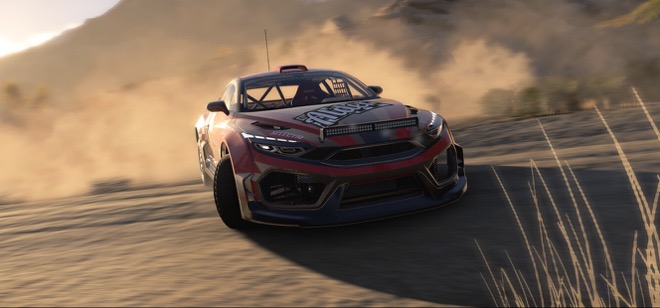
100–110 fps
Hirochi, medium-high · September 2026
Runs for free. Heavy maps hit the graphics card, as they would on a modest PC.
The full BeamNG.drive report →
on average 53 fps
ultra graphics · 3 Oct 2026 · M3 Pro, the owner's measurement
Runs through Steam for free: Uncork installs the components it needs (.NET, DirectX, fonts). Pro adds one-click Content Manager, a race screen, fixes for modded graphics and G923 force feedback. In the rain with RainFX — about 34 fps (27 Sep 2026, our measurement).
Assetto Corsa on a Mac: setup, launch and force feedback →Also tested: MiSide, Tiny Bunny, Hello Neighbor and Geometry Dash, and of the stores, Steam and the Epic Games Store. If your game is not on the list, it is untested, not broken: try it — that is free.
Will not run: Valorant, Fortnite, Apex, recent Call of Duty, Destiny 2, PUBG, Rainbow Six and other games with kernel-level anti-cheat: macOS does not load Windows drivers, and Uncork will not bypass protections. If those are the only games you play, Uncork is not for you.
Every tested game with date and machine → Anti-cheat games: what will not run and what to do →
No account, no payment and no Terminal: Uncork installs whatever is missing. Most of the space goes to the game itself: CS2 in Steam takes about 85 GB, Uncork together with Steam about 3 GB.
The image downloads straight away — no sign-in, email or password. Open it and drag Uncork to Applications.
The Environment screen shows what is missing and installs it with buttons: Rosetta 2, the engine, the graphics libraries — about 250 MB, with Apple’s licence to accept. Then “Create a bottle and install Steam”.
You sign in inside Steam’s own window: Uncork never sees your password or Steam Guard code. Install your game and it appears in the Uncork library. After your first game Uncork offers a 7-day Pro trial once — you can answer “Not now”.
Updates: Uncork installs 1.0.x fixes itself when you quit it (you can turn this off in Settings), versions 1.1 and later come with the Update button; it checks every build’s signature before installing.
We only publish what we measured ourselves, and always say when and on what. All three measurements below were taken on a MacBook Pro 14″ with an M3 Pro (14-core GPU, 18 GB); another machine will give different numbers.
119 vs 843
In a second of movement a 1000 Hz mouse sent 843 movements, and an ordinary program received them as 119 batches — one per display frame. In games Uncork Pro reads the mouse from the device.
25 Sep 2026 · Logitech G309 at 1000 Hz, 120 Hz display · one 20-second recording, outside a game
102–147 fps
Four full runs on D3DMetal: a 1512×982 window, shadows, textures and particles at minimum. An example, not a ceiling or a promise: another map or another Mac will differ.
30 Sep 2026 · four runs in order · CT spawn · Even frames off
87% vs 18%
The share of gaps between frames within ±1 ms of the mean: 87% with Even frames at 80, 18% without it at 118 fps. Latency to the screen did not grow: 19 ms versus 21.
23 Sep 2026 · de_dust2 with bots, on battery · one run each · the mode is for single-player games
Everything you need to play is free, with no account and no time limit. Uncork Pro is an optional extra for €19, once: for those who notice every frame and mouse movement, race with a wheel or want fps on top of the game.
€0 — the free core. €19 once — Uncork Pro, no subscription and no end date.
Pro trial — 7 days, from the moment you start the trial in Uncork on this Mac. The trial needs no account; one trial per Mac.
One payment — Telegram Stars or crypto (USDT, TON, BTC and more); cards are not accepted yet. Nothing is charged automatically: there is no auto-renewal. Not for you? Write in the first 14 days after payment and we refund you, no reasons asked. Invited by a friend? You get 15 % off Uncork Pro.
Pro is every update before version 2.0, that is, every 1.x version. 2.0 comes when Apple ends support for Rosetta 2: Apple says that from macOS 28 it will remain only for older games. On 1.x your Pro stays for good — details in the terms.
You start the 7-day Pro trial in Uncork on this Mac, with no account: the app sends only this Mac’s fingerprint, so that there is one trial per Mac. Decide to buy Pro and the app opens sign-in: you confirm this Mac in the browser, the trial days left move to your account, and the profile opens the payment. Already have an account? Press “Sign in”; the UNCK-XXXX-XXXX-XXXX code remains for when a browser cannot be used. Pro is tied to one Mac. Changing Macs? Press “Change Mac” in your profile or write to hello@uncork.win: the binding is released at once if you haven’t changed Macs yourself in the last 30 days (more often — by hand, on request), and then you sign in to Uncork on the new Mac.
Uncork neither emulates Windows nor virtualises it. It translates Windows calls into macOS calls and turns DirectX into Metal. The game believes it is on Windows.
Its own folder with its own C: drive, registry and settings. The store and games install into it and go away with it. It is not a sandbox: the Z: drive inside points at the root of your Mac, so a game reaches files as far as macOS lets Uncork reach. You can keep several bottles.
Uncork installs the Windows build of Steam and fixes what usually breaks in it on a Mac. The Epic Games Launcher is supported too — the library shows games from both stores together.
Play starts the game with D3DMetal or DXMT. Uncork watches the processes, keeps a log, and stops the screen from dimming while you are in a match.
Most of what makes games on a Mac feel wrong lives in the compatibility layer’s macOS driver, not in the launcher. So Uncork builds that driver itself.
macOS delivers mouse events to an ordinary program in bursts, once per display frame. In a shooter your aim stutters: in our 22 September measurement (chart below) about six movements on average arrived as one lump. Our driver reads the device’s own reports at its own rate.
needs the Input Monitoring permission; without it the driver behaves like the stock one
Measurements and code: why aim feels floaty on a Mac →
Average fps says nothing about smoothness: CS2 at 118 fps shows gaps between frames on screen that jump from 4 to 13 ms. Even frames releases every frame on an even grid matched to the display’s steps — 120, 80, 60. It is for single-player games; in a competitive shooter leave it off.
Measured in CS2, at 80: 87% of intervals within 1 ms of the mean, versus 18% without it; latency to the screen did not grow — 19 ms versus 21
CS2 takes macOS key auto-repeat badly: hold a key and the image trembles. Uncork switches repeat off while the cursor is hidden (in the game) and back on when it returns, so chat and console type normally.
Apple’s D3DMetal lets the CPU run ahead of the GPU, and that turns into mouse lag. DXMT keeps the frame queue short, and the aim feels steadier. What that costs in frames we do not know: we never ran a matched comparison. One click in the bottle settings, separately for each bottle.
The driver can log how many frames are queued and how many milliseconds a mouse movement waits to be handled. So “it got better” here is a number, not a feeling.
Connect a DualSense, DualShock 4 or Xbox controller and a battery badge pops up in the corner of the window. The touchpad moves the pointer, ✕ clicks, ○ is Esc, the d-pad sends arrow keys, L1 and R1 switch tabs. While a game runs, the mode stays quiet: the controller belongs to the game.
needs the Accessibility permission; over Bluetooth the DualSense touchpad reports the finger every ~15 ms — Uncork smooths the steps to the display refresh
macOS gives a game CPU and GPU priority and polls wireless controllers more often — but only if it recognises the process as a game, and a Windows game is anonymous to it. Uncork launches each from its own tiny app in the Games category, and macOS turns Game Mode on by itself when the game is full screen.
switchable in the bottle settings; while Game Mode is on, macOS itself shows its icon in the menu bar
M1 and newer. Uncork does not run on Intel Macs.
We test on the current one; older versions are untested.
Uncork downloads the graphics libraries itself — about 250 MB, once, with a checksum check and after you accept Apple’s licence. No Terminal needed.
The runtime and Steam come to about 3 GB: 1.1 for the engine and 1.7 for a bottle with Steam, measured here. After that it is whatever the games weigh; CS2 needs 85 GB, better with room for updates. The app shows free space before installing.
Tools inside the bottle ask for it; until it is there the app will not let you create a bottle. The checks screen has a button that installs it (Apple’s own command, no terminal). After updating to macOS 27 it does not come back on its own: what to do.
You buy the games yourself. Uncork downloads nothing outside Steam.
A compatibility layer costs frames. Uncork will not turn a laptop into a gaming PC, and we will not draw charts where it performs "like native".
What we do instead: remove the things that ruin how a game feels — a stuttering aim, mouse lag, a trembling picture. Sometimes that matters more than ten frames.
straight talk
A small private project. We play on this ourselves — that is why fixes are quick, and why we do not promise what we have not checked.
Write to us on Telegram ↗Uncork is signed and notarized by Apple, but games and hardware vary: something may not work on your Mac. We fix things quickly, because we play on this ourselves.
Never. Neither the password nor the Steam Guard code: you type them into Steam itself, as on any computer. Uncork does not ask for them, store them or send them anywhere.
We do not defeat anti-cheat and we do not fetch games outside Steam. Nobody can guarantee your account will never be flagged — decide for yourself what you are risking.
The log opens with a button: it shows the commands Uncork runs during setup and launch. The environment check shows what is installed and what exactly is broken. What the app sends over the network is on the page "What Uncork sends".
Games launch without a connection: the free core needs no key. Pro features run on a key the app renews on its own. The key lasts a week: offline longer than that, Pro switches off until you next go online.
Uncork’s source code is not published. The driver derived from the open-source compatibility layer is under LGPL 2.1: the licences and the source offer are in the app — Settings → Help → Component licences. If open source is a must, the comparison page lists open-source apps.
We will warn you at least 30 days ahead — on the site and in the app — and release a last version that needs no server of ours: on Macs where it is installed it runs games and Pro features without signing in. Bottles, Steam and games stay on your Mac.
Games and the Pro trial need no account: the computer is recognised by a fingerprint, a hash of the Mac’s identifier, from which neither the machine nor you can practically be traced. Buy Pro and you sign in (Google or an emailed code) — then we have your email and name; we never see a password. We do not ask for a phone number.
Yes: running Windows games from Steam and Epic, bottles, Game Mode, gamepad mode, the mouse check, Windows components (.NET, DirectX, fonts) and fixes after crashes are free, with no account and no time limit. Only Uncork Pro is paid: the mouse straight from the device, Even frames, the in-game panel, Content Manager and the race screen for Assetto Corsa, and Logitech G923 force feedback. It costs €19 once, and you can try it for 7 days.
Uncork Pro is €19 once, no end date, every 1.x version: the mouse read from the device, Even frames in single-player games (with them, an even 60 on battery), the in-game panel, one-click Content Manager and the race screen for Assetto Corsa, and Logitech G923 force feedback; new versions reach Pro first, and you get a direct line to the developer. You can try Pro: 7 days, from the moment you start the trial in Uncork on this Mac, with no account needed for the trial. One trial per Mac; sign in partway through and the days left move to your account. Students of the partner school get an extra week of Pro on top, and anyone invited by a friend gets 15 % off Uncork Pro. Payment is by Telegram Stars or crypto (USDT, TON, BTC and more); cards are not accepted yet. Nothing is charged automatically: there is no auto-renewal. Not for you? Write in the first 14 days after payment and we refund you, no reasons asked.
The free part does what other apps do: it puts Steam or Epic in a bottle and runs games. On top of that is our own work: the mouse is read straight from the device (we found nothing like it in the apps we checked), frames in single-player games land evenly, Game Mode turns on for every Windows game, and a controller drives the Mac's pointer. What we lack and others have — open source and a large database of tested games — is on the comparison page, with dates.
Nothing: games launch without Pro — launching, Steam, bottles and repairs are free. When the trial or Pro time runs out, only Pro features switch off: the mouse read from the device, Even frames, the in-game panel, the Assetto Corsa race screen and wheel force feedback. Everything on disk stays where it is and stays yours — the bottle, the Steam installed in it and the games themselves. It is an ordinary folder in your user library; you can copy it to another drive or delete it yourself. We erase nothing, break nothing and lock nothing from the inside. Pro you have bought has no end date on every 1.x version.
Yes, your own. Uncork installs the Windows build of Steam, you sign in yourself and install what you own. The password and Steam Guard code are typed into Steam's own window; Uncork never asks for them. Games you own but have not installed yet — the “64 more” in the demo above — Uncork finds in Steam's own files on your Mac, with no network and no key. Separately there is an optional Web API key: with the list straight from Steam it is clearer which account owns which game. The key cannot sign in, buy anything or change anything in the account; you create it on Steam's site and revoke it there.
Games launch without a connection: the free core needs no key. The driver's key is only for Pro features — it lasts a week and the app renews it silently while you are online. A week offline and you notice nothing. Longer, and Pro switches off until you go online once; the games themselves keep launching.
All questions and answers → Compared with Highball, Sikarugir, Porting Kit and others → What to use instead of Whisky → How to play Windows games on a Mac: every method →
The choice is remembered. Dark and AMOLED for the evening, neon for anyone used to deep-blue game interfaces.
Mac with M1 or later · macOS 14+ · no account · Steam, Epic and more