What to use instead of Whisky on a Mac: free and paid options
Uncork access updated 20 November 2026 · facts about other apps and Whisky's download addresses checked on 31 October 2026
What to use instead of Whisky on an Apple Silicon Mac: for free, the Whisky fork by frankea, Highball, Uncork or Porting Kit; paid, Bourbon 26 or Malbec. Uncork is our own app, not a Whisky fork: it is free, notarized by Apple, and since version 1.2 it copies Whisky bottles with their installed games and leaves the originals untouched (we have not yet tried the import on a bottle created by Whisky itself). Whisky itself is no longer developed: its last release came on 5 April 2025, and a fresh install cannot download its compatibility layer — on 31 October 2026 both download addresses returned error 404.
Whisky stopped working — what now?
- Don't delete Whisky or its bottles. They hold your installed games and saves. By default the bottles live in
~/Library/Containers/com.isaacmarovitz.Whisky/Bottles; if you created a bottle somewhere else, Whisky keeps its path inBottleVM.plistin the same folder. - Don't wait for a fix. No one is left to fix Whisky: the repository was archived on 11 May 2025, and a fresh install cannot download its compatibility layer (checked on 31 October 2026).
- Install a replacement that takes your bottles. Uncork copies them along with the games, so nothing is downloaded again (we have not yet tried it on a bottle created by Whisky itself); the frankea fork of Whisky attaches them in place. The steps are in “Can I move my bottles and games from Whisky?” below, and the comparison is in the table.

Does Whisky still work in 2026?
A Whisky you have already installed keeps working until a macOS update breaks it. A fresh install cannot finish setting up: by its source code, Whisky 2.3.5 downloads its compatibility layer from two addresses on the project's server on first launch, and without that layer Windows programs cannot run in it. Both addresses returned error 404 on 3 and on 31 October 2026 (we checked with HEAD and GET requests; the project's website itself opens).
The last release, 2.3.5, came on 5 April 2025. On 9 April the authors added a notice to the README: the app is no longer maintained and games in it may break at any time. On 11 May 2025 the repository was archived, and Homebrew has marked its cask as deprecated since 9 April 2025. There will be no more fixes, no new versions of the compatibility layer and no per-game tweaks.
What replaces Whisky: a comparison as of 31 October 2026
We make Uncork, so we have a stake in this comparison. Facts about the other apps come from their sites, READMEs and release notes on 31 October 2026; we did not run those apps ourselves. Licences, stores and notarization for sixteen apps are on the Compare page.
| App | Price | Whisky bottles | Needs | What stands out |
|---|---|---|---|---|
| Uncork | compatible Steam games launch for free without an Uncork account. Optional game features are currently free too | copies them with the installed games, never changes the original | Apple Silicon, macOS 14+ | runs games from Steam; also installs the Epic client and sees both libraries (launching Epic games not tested); 14 games tested by us, plus community reports from a highball-db snapshot (540 entries); closed source |
| Whisky fork (frankea) | free, open source (GPL-3.0) | uses them in place, without copying (per its README) | Apple Silicon, macOS 15+ | the old Whisky interface; latest release 3.7.0 of 30 August 2026 |
| Highball | free, open source (GPL-3.0); it says there will never be a paid tier | does not import them: per its page, you reinstall your games | Apple Silicon, macOS 14+ | an open database: 21 games verified by hand, 575 by community consensus, 49 that will not run; beta |
| Sikarugir | free | not stated | macOS 14.6+ | builds a separate app for each game; its README says it is not a Whisky replacement |
| Porting Kit | free, pay what you want | not stated | Apple Silicon or Intel | almost 1500 ready-made game ports, as the project describes it |
| Mythic | free, open source (GPL-3.0) | not stated | macOS 14+ | games from Epic, no Steam yet; latest (pre-)release 0.6.0 of 27 December 2025 |
| Bourbon 26 | from $29.99 once (on 31 October 2026, from $19.49 in a sale) | not stated | Apple Silicon | the app is closed, its recipes are open (MIT); one purchase covers 3 Macs |
| Malbec | $9.99 until 30 November 2026, then $12.99; a year of new engine releases included | not stated | Apple Silicon, macOS 26.5+ | Steam and Battle.net; no DirectX 12 yet |
“Not stated” means only that the project's pages we read say nothing about it.
Which Whisky alternative should I pick?
- You still have Whisky bottles with games in them. Uncork copies them, the Whisky fork uses them in place; how the import works in Uncork is below.
- You want it free and without setup: games from Steam. Uncork or Highball: neither asks you to sign up. Uncork also translates game text right over the screen for free (macOS 15 or newer).
- You want the Whisky you know, still maintained. The frankea fork: the old interface and open source, but it needs macOS 15.
- You want to know whether your games will run before you install them. The Uncork catalog gives each game's basis: our own test, player reports, a Mac version, or an anti-cheat or publisher block; with Steam for Mac installed, the “Find my games” button sorts your Steam library into the same groups, plus a forecast and “Don’t know yet”. The player reports and blocks come from highball-db, the open compatibility data (CC0) that Highball publishes and both apps use.
- A separate app per game, or ready-made ports. Sikarugir builds a wrapper per game, Porting Kit installs ready-made ports and also works on Intel Macs.
- Games from Epic, GOG or Amazon. Heroic is free and open source. Mythic also handles Epic, but its latest release came out in December 2025.
- You are ready to pay. Bourbon 26 or Malbec; prices are in the table above.
Can I move my bottles and games from Whisky?
Yes. In Uncork this has been free since version 1.2 (8 October 2026):
- Close Whisky and the programs in the bottle.
- In Uncork, click “New bottle” → “Import from Whisky…”. The button appears when Uncork finds Whisky bottles.
- Pick a bottle — the list shows its name, how many Steam games it holds and how big it is — and click “Import”.
- Start a game from the new bottle. Keep the original in Whisky until your games run in Uncork.
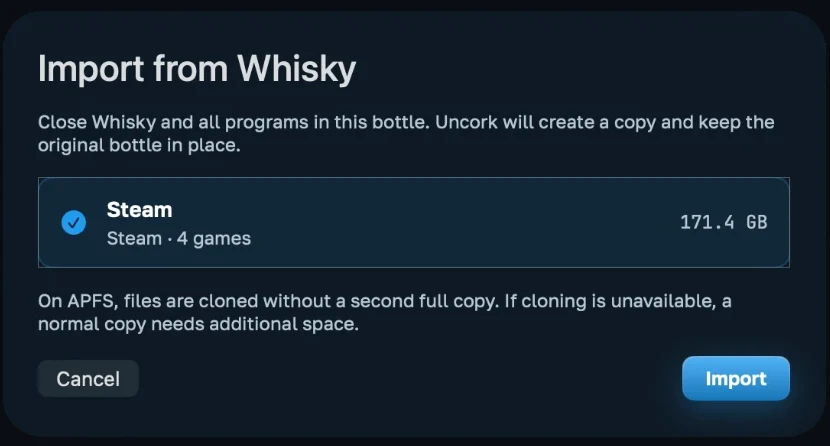
Uncork copies the bottle with the games already installed, so nothing is downloaded again. On the same disk the copy is an APFS clone: it appears at once and takes almost no extra space; if cloning is not possible, you need room for an ordinary copy. Uncork never changes or deletes the Whisky bottle, and it moves the copy to its own engine the usual way. Only Windows 10 and 11 are kept: an older Windows version in the bottle becomes Windows 10.
What we checked: the whole path with a real bottle made by our engine and described the way Whisky describes its bottles. A bottle created by Whisky itself we have not imported yet, so keep the original until your games start in Uncork.
Elsewhere: the Whisky fork, per its README, uses the original app's bottles in place and copies nothing (File → Migrate from the Original Whisky). Highball, per its page on switching from Whisky, does not import bottles and plans no converter: it suggests reinstalling your games and taking your saves out by hand.
Will my games run after Whisky?
What is known about running a particular game — our own test, player reports with dates and Macs, or an anti-cheat or publisher block — is on its page. According to player reports, these run on Apple Silicon Macs, for example: Grand Theft Auto V Legacy, Satisfactory, Forza Horizon 6, Elden Ring, Marvel’s Spider-Man Remastered, Outer Wilds, RuneScape: Dragonwilds, Deep Rock Galactic, Dark Souls III and The Elder Scrolls V: Skyrim Special Edition. The rest are in the catalog.
When Uncork fits
- You still have Whisky bottles with installed games and do not want to download everything again.
- You want to run games from your own Steam library for free: no Terminal, no Uncork account, with macOS Game Mode.
- You want game text translated over the screen (free, beta, macOS 15 or newer): more on the page “On-screen game translation”.
- You play single-player and racing games and care about the mouse read straight from the device, “Even frames” and Logitech G923 force feedback. These optional features are currently free to enable. Existing purchases keep their benefits under the terms of use. More on why aim feels floaty on a Mac, CS2 on a Mac and the wheel in Assetto Corsa.
When Uncork does not fit
- You need open source: Uncork's code is closed. The driver, derived from a component under the LGPL, ships with the licence and an offer of its source.
- You have an Intel Mac or macOS older than 14.
- You need a large list of tested games: we have tested 14 ourselves; the app adds community reports from a highball-db snapshot (540 entries), see the list.
- You play only games with kernel-level anti-cheat: they will not run in any app of this kind, see the anti-cheat page.
- You need it to run without Rosetta: games in Uncork run only through it, and Apple says that from macOS 28 it will remain only for older games. More in “Rosetta and macOS 27”.
Read next
- Free and paid apps for Windows games on a Mac, compared — price, licence, stores and notarization of sixteen apps; Uncork runs compatible Steam games for free
- How to play Windows games on an Apple Silicon Mac: every method, free and paid — every way to play Windows games on Apple Silicon, with price and limits
- Uncork: frequently asked questions — price, safety, first launch, supported Macs and games
Won’t start, crashes or something is unclear? Message us on Telegram at @uncorkwin and we’ll sort it out. If you sent a problem report from Uncork, include its number.